How Under-Display Fingerprint Readers Actually Work
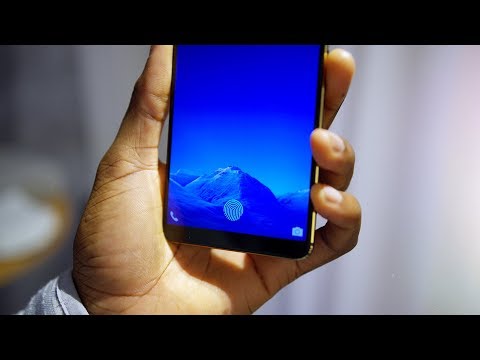 Photo: N43 and Hermes
The sensor did not move under the display. The display became the sensor's window: your finger presses the glass, and either light or sound reads the ridges through it.
Source video: The In-Glass Fingerprint Reader: Explained! · Marques Brownlee · approximately 2,389,156 views observed via yt-dlp on 2026-09-01. Independently researched by N43 and Hermes.
01 Why the Sensor Moved Under the Screen
For a decade, the fingerprint reader was a physical button: a capacitive pad on the front chin or the back of the phone, sometimes a slim side-mounted strip by the power key. That arrangement worked, but it competed with something else the industry wanted. As screens stretched toward the phone's edges, a front-facing sensor meant reserving a strip of valuable display space for hardware that only did one thing. A rear pad freed the front, but you had to grope for it, and it vanished the moment the phone sat on a desk or a wireless charger.
In 2017 and 2018, two changes converged. OLED panels replaced LCDs in flagships, and OLEDs have a property LCDs lack: the pixels emit their own light, and the layers between pixels can be thin enough for something underneath to see through them. Meanwhile, sensor makers, most prominently Goodix and Qualcomm, shrank optical and ultrasonic scanners until they fit behind the display stack. Vivo shipped the first mass-market under-display optical phone, the X20 Plus UD, in early 2018; Huawei and Xiaomi followed within months; by 2019 Samsung shipped ultrasonic in the Galaxy S10 and the approach became the default for bezel-less flagships.
The pitch was never just aesthetics. Under-display readers promised the finger lands exactly where the eye already is: you look at the screen and you press the screen. The tradeoff, as every implementation shows, is that the sensor now reads through several extra layers of glass, adhesive, and display circuitry. Everything in this article follows from how engineers solved that one problem.
02 The Capacitive Baseline: How the Old Buttons Worked
The predecessor technology explains the standard that under-display scanners had to meet. A capacitive sensor is a dense grid of tiny metal plates, each forming one plate of a capacitor whose other plate is, effectively, your finger. Ridge skin presses against the sensor cover and sits close to the plates, raising the local capacitance; valleys hover a few dozen microns above it and barely change the reading at all. Sweep the grid, record capacitance at every cell, and the ridge-valley pattern falls out as an image.
Capacitive readers were fast, cheap, and hard to fool with a flat photograph, because paper changes the capacitance pattern differently than live ridges. What they could not do was see through anything thick. The field is short-range: put 800 microns of cover glass between the finger and the plates, the contrast between ridge and valley collapses, and the image dies. That physical limit is the entire reason under-display readers abandoned capacitance for optics and acoustics, which both travel happily through glass.
03 Optical Readers: The OLED as a Light Table
The first under-display approach reads the finger the way a scanner reads a page: with light. The panel's OLED pixels over the sensor window flash bright, illuminating the fingertip pressed against the glass. Some designs add a dedicated infrared emitter so the scan can run in the dark. The light reflects off the ridges and valleys differently, travels back down through the display's gaps, and lands on a compact CMOS image sensor underneath, which photographs the fingertip. Software straightens, sharpens, and binarizes the image, then matches it against the enrolled template.
The OLED connection is not incidental; it is the enabling fact. An LCD needs a backlight that blocks everything behind it, so the sensor would see nothing. An OLED emits its own light, and between the subpixels there are real, if narrow, gaps. Manufacturers enlarge these transparent channels over the sensor area so enough light gets through in both directions. This is also why optical readers were first and still are most common in OLED flagships, and why some early units requested a slightly brighter pulse in that zone when you touched it.
Optical's weakness is the weakness of any camera: it records appearance, not depth. A sufficiently good print of the correct finger, on material that scatters light the way skin does, can produce an image close enough to fool basic implementations. Vendors answered with liveness heuristics: checking for the faint shading gradients of pressing skin, the subtle texture of pores, and in some designs the way light scatters in the shallow layers below the skin surface. It is a measured fact that early optical readers were spoofed in lab demonstrations with molds and fake prints; it is fair interpretation that this pushed the premium market toward ultrasound.
04 Ultrasonic Readers: Sonar for Your Fingertip
Qualcomm's 3D Sonic line, the dominant ultrasonic design, inverts the problem. Instead of seeing through the display, it listens through it. A piezoelectric transducer under the panel fires ultrasonic pulses, roughly in the 8 MHz range, upward through the glass. When sound hits the boundary between glass and whatever touches it, part of it reflects back. Ridges, pressed hard against the surface, bounce the pulse back early and strong; valleys return a weaker, later echo; and the tiny pores in your skin return fainter signatures of their own. The same transducer array works as a microphone, timing each returning echo per pixel.
From those arrival times and amplitudes, the sensor computes not a photograph but a depth map: a genuine 3D model of the ridge structure, complete with pore-level detail, captured through roughly 800 microns of cover glass. That thickness figure matters because it is what allows the sensor to sit under the display stack without redesigning the glass, and it is why ultrasonic readers work with the factory screen protector still in place more reliably than first-generation optical units did.
The cost is speed and light. Ultrasonic capture takes longer than a single optical exposure, so early implementations felt slightly slower, and the transducer needs a clean acoustic path: bubbles, dust, or an ill-fitting third-party protector between glass and skin scatter the pulses. Ultrasonic also genuinely earns its security claim. A flat printed photograph has no depth to reflect, and even a 3D mold must reproduce pore-scale structure to match the template. The fingerprint, in this design, is stored as a mathematical model of a surface rather than a picture of a pattern.
Optical vs ultrasonic under-display fingerprint sensing, from vendor-published specifications and security literature. N43 and Hermes, 2026-09-01.
05 Reading Through the Display: The Stack Problem
Whichever sensing method is used, the sensor's real job is the same: read a fingertip through a sandwich it cannot remove. Above the sensor sit the OLED substrate and its drive circuitry, an adhesive or filter layer that hides the sensor window from view, the touch digitizer, and the cover glass, which on a modern flagship is around 800 microns of aluminosilicate. Optical designs need transparent channels through the display gaps; ultrasonic designs need the whole stack to carry sound without excessive loss. Both need the display area above the sensor to look, to the eye, identical to the rest of the panel.
This is why under-display readers occupy a defined zone rather than working anywhere you press. The sensor module has a fixed footprint, the display above it gets a modified pixel layout, and the software marks the spot with a glowing on-screen fingerprint icon. The icon is more than decoration: it is calibration, telling you exactly where the reading zone is so the capture geometry stays inside the design margin. Press half off the icon and you are outside the usable aperture, which is why misaligned presses fail far more often than the sensor itself does.
06 Security, Spoofing, and Liveness
Every fingerprint system ultimately compares a fresh capture against a stored template, and the security of the whole chain rests on what a spoof would have to reproduce. Capacitive readers raised the bar above photographs. Optical readers, measuring reflected light, were a step back down in that one dimension: a determined attacker with a good latent print and the right material could build a fake fingertip that scattered light convincingly. Documented laboratory demonstrations against early optical phones did exactly that, and it is a fair criticism of the first generation.
Ultrasonic depth maps close most of that gap, because the spoof must now be three-dimensional and carry pore-scale texture. The industry also added system-level defenses that no sensor provides alone: rate limiting after failed attempts, requiring the device to be unlocked recently before authorizing payments, and on modern phones the fingerprint template never leaves a secure enclave or trusted execution environment. Measured fact versus interpretation: it is measured that ultrasonic captures more spoof-relevant information than optical; it is interpretation, though well-supported, that this makes tap-to-unlock security "sufficient" for an individual user, because attacks move to the point of least resistance, which is rarely the sensor itself.
The stack an under-display reader must see or hear through, drawn to approximate scale. Sources: Goodix and Qualcomm sensor documentation. N43 and Hermes, 2026-09-01.
07 Limits and What Comes Next
The everyday failure modes are well known and physical, not software bugs. Wet or freshly washed fingers change both the optics and the acoustics: water fills the valleys, flattening optical contrast and blurring ultrasonic echoes. Cold weather and dry skin do something similar to a lesser degree. Thick or bubbled screen protectors are the classic ultrasonic killer, because an air gap between glass and film reflects sound at the boundary; optical units degrade less but still lose contrast. And every under-display design shares one limitation the old capacitive buttons did not: a fixed, marked reading zone that demands a deliberate, well-placed press.
The next stage aims to dissolve that zone. Full-display fingerprint sensing, where the sensor grows until it covers most of the panel and the icon disappears, has been demonstrated in engineering samples and leaks repeatedly since about 2020; shipping it depends on cost and on driving a much larger sensor without wrecking battery life. In parallel, 3D face recognition remains the strongest rival, and the two will keep coexisting because they fail differently: a face scan struggles in bright sun and with a masked face, a fingerprint with wet hands. The fingerprint reader moved under the screen and, so far, that is where it stayed.
References
- Wikipedia: Fingerprint recognition — overview of sensor technologies, optical and ultrasonic sensing, and spoofing attacks
- Goodix, goodix.com — optical under-display fingerprint sensor specifications
- Qualcomm, qualcomm.com — 3D Sonic ultrasonic fingerprint sensor documentation (~8 MHz operation, glass penetration depth)
- Marques Brownlee, The In-Glass Fingerprint Reader: Explained! (Marques Brownlee, ~2,389,156 views, observed 2026-09-01)
By N43 and Hermes for DutyStation News.